
Risoni for Mac
Bring your recipes, meal plan, shopping list and cooking steps together on your Mac. Start with one recipe and follow it through dinner.
Try one dinner
- Add a recipe or open a sample in Recipes.
- Choose Plan meal, then pick the day and servings.
- Open Shopping to review amounts and omit anything you already have.
- Choose Cook from the planned meal and work through the steps.
- Close cooking and reopen the recipe to resume. Choose Finish cooking when you are done.
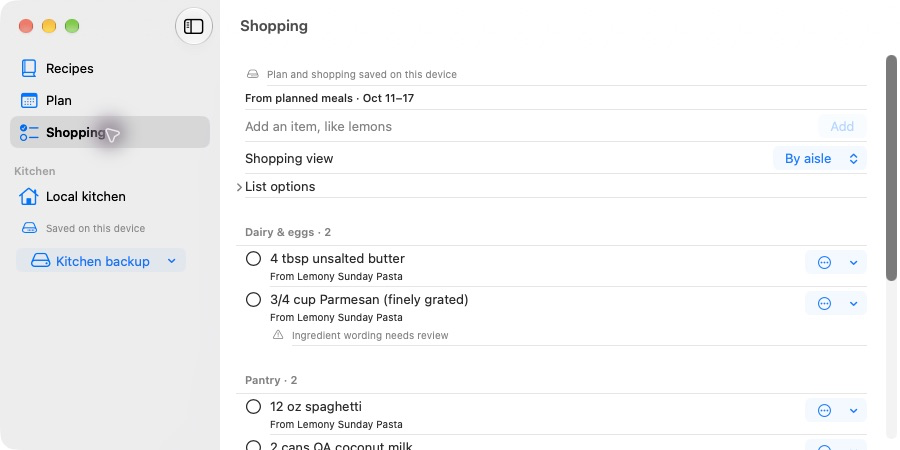
Use the sidebar to move between Recipes, Plan and Shopping. Here, Shopping groups the planned ingredients by aisle for a trip to the store.
Find your way around
Choose Recipes, Plan or Shopping in the sidebar. Search Recipes by title or ingredient.
A kitchen is the library you are working in. Local kitchen saves on this Mac. A shared iCloud kitchen is separate: creating or joining one does not move your existing recipes automatically.
Before you begin
Beta access requires Adam's approval through the person who invited you. This public guide does not provide a download or grant access. Follow your approved invitation and installation guide, and check the shared release notes.
Read the beta limits, then try the tester checklist. Keep your original recipe exports while testing.
The shopping screenshots use sample ingredients and made-up groceries. Their appearance may differ slightly from the beta you receive.